
 Reading Time: 3 minutes
An alpha-numeric unordered list order helps readers search for an item. Meanwhile, content and accessibility strategists stress not to order them. Here’s my challenge to that direction.
The theory of order
Unordered — or bulleted list items can list in any order. When an order is needed, we know to swap the unordered list for an ordered — numeric list.
This is misinterpreted by most content and accessibility workers. They understand the unordered list items don’t need an ontology or taxonomy. When we account for how people scan-read or return to content to find a specific piece of information, any order is very useful to their memory, recall, and search.
Almost all modern languages include a standardised alphabetical or collation order. It helps to organise information in dictionaries, directories, glossaries — and lists.
Denying unordered order
There’s a historical reason for strategists to specify not writing unordered lists in an order. And there’s the point; it’s historical. When localisation and translation is completed manually, it adds work to re-order the list.
What’s missing from the direction is an understanding of how digital products are engineered: an ignorance of anything in the layers beyond the visual screen or printed output.
Allowing order
Bringing order to an unordered list doesn’t make an ordered list. The ordered list is a range from first to last concept. An alpha-numeric isn’t a concept, its a collation of “tags” that brings order to cognitive processes. That’s a good thing.
Our accessibility and content strategists preparing to roast me need to know the following. We can write the unordered list in any order as you propose and, by complete fluke and without design, the items may follow an alpha-numeric order. Do you swap items around to break up that order?
Digital engineering
So the belief we need to break is the one referencing localisation and translation effects and effort. Let’s negate those using our digital medium: HTML and a script.
Our HTML product pages should be annotated with a lang attribute and value like, en for English and fr for French. We can designate a lang value for specific elements on the page, too.
So, to allow us to bring an alpha-numeric order to an unordered list when displayed in any language without effort, we only need to use a script that automates the process for us. Here’s a plan for the script:
- Read the list
- Understand the list’s intended language.
- Order the list numerically and alphabetically
- Detect when the page is translated in the browser
- Update the list order to match the new language
As I’m not an engineer, to demonstrate this I prompted Google Gemini with my requirements. It returned a script that works first-time in Google Chrome with the Translate feature enabled.
The script detects the language, updates the order, and when the page is translated in the browser, the script updates the lists again for each new language.
Intl.Collator: In the standard JavaScript, .sort() converts items to strings and compares UTF-16 code unit values. This fails in French where accented characters might be misplaced or numeric lists where “10” comes before “2”. The Intl.Collator API with { numeric: true } solves both.
MutationObserver: This is the solution for reacting to browser translations. When a tool like Google Translate swaps “Apple” for “Pomme,” it modifies the characterData or childList of the <li>. The observer detects this and triggers the sortList() function again.
I can’t guarantee the effect for all written script types, and I can suggest an engineer should sort problematic languages for you.
Refining the listed experience
For the best content experience for ordered lists, consider an Inclusive nested list nomenclature.
Summary
There’s no need in a modern digital platform for accessibility and content strategists to mention not ordering ordered lists ever again when the needed engineering is available to us.
I’m glad we all cleared that up.
Demonstration
Open the live demonstration page, script-for-l10n.html from my Learningtoo labs. You can use the browser Translate feature to break it.
Design limitations include for the following:
- RTL languages.
- More complex language forms like Chinese and others.
- The list designated as French is not always preserved in French. That matters.
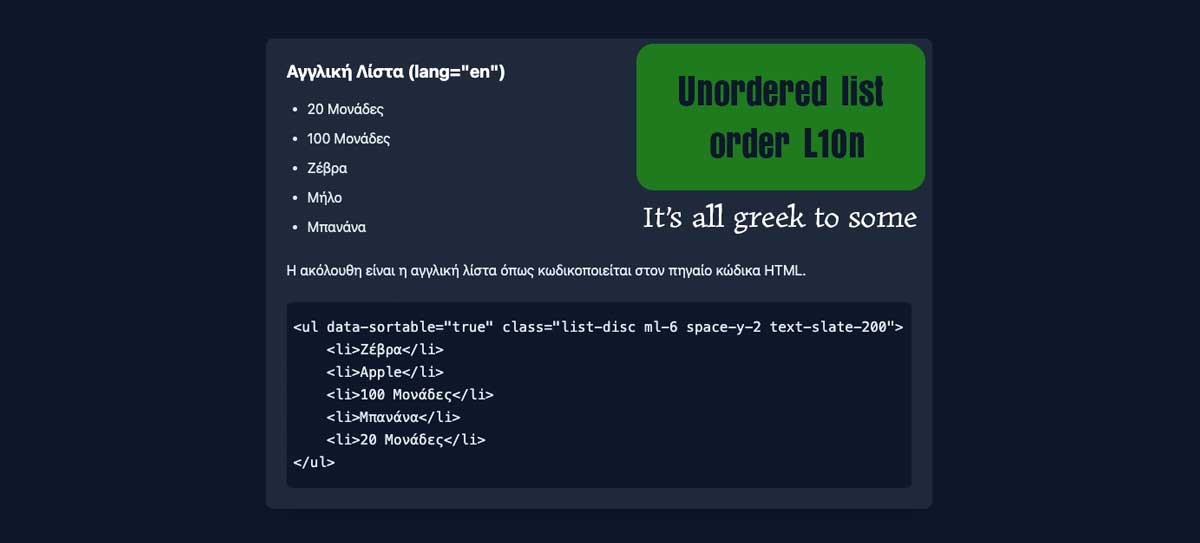
The following figures demonstrate the script effects on an English page translated to French, Greek, and Japanese. It’s only a demonstration and you can likely fix any issues with your own LLM.
The following is the hard-coded unordered list using Google Chrome browser’s Translate feature. You’ll note its order is deliberately unordered as, Z, A, 100, B, and 10.
<ul data-sortable="true" class="list-disc ml-6 space-y-2 text-slate-200">
  <li>Zebra</li>
  <li>Apple</li>
  <li>100 Units</li>
  <li>Banana</li>
  <li>20 Units</li>
</ul>
The English list processed with the Javascript:
- 20 Units
- 100 Units
- Apple
- Banana
- Zebra
This is the list encoded as French :
- 20 unités
- 100 unités
- Banane
- Pomme
- Zèbre
- 20ユニット
- 100ユニット
- シマウマ
- バナナ
- りんご
- 20 Μονάδες
- 100 Μονάδες
- Ζέβρα
- Μήλο
- Μπανάνα